|
The Battle
There is a perpetual war on, and it is between Intel and AMD. The winner gets the large share of the PC market. The loser? Well, there is none! This fierce competition is driving the CPU rapidly to more powerful levels. Indeed, one can get lost in the shuffle. One can't just go to the internet review sites and learn all about processors without knowing the basics. That's where this section comes in.
The Stuff
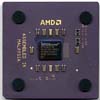
Recently, Intel and AMD have been battling for reign over the top spot in x86 Processor performance. As we all know, Intel has been backing a new memory standard, called Rambus. AMD on the other hand, has been working with chipset manufacturers such as VIA, ALi and SiS in order to use an upcoming evolution of SDRAM, called DDR-SDRAM. Rambus, indeed, has some flaws, such as price, and latency issues. Along with problems in Chipsets to support the Intel Pentium iii, the AMD Athlon processor has slowly and surely been gaining market share like never before.
Many users, when building a new computer, are faced with a dilemma. To get a Pentium iii, or an Athlon. After all, it's your money, and you don't just want to blow it away in the wind. After that choice is made, what chipset to use in another heart wrencher. For the Pentium iii, there are Intel's own i820 and i840, plagued by delays and problems, and the recently introduced i815e, with integrated video. There is also the VIA133A Chipset, which has most of the features of Intel's chipsets, minus the dreaded Rambus DRAM (RDRAM). Those that want to live life on the edge can opt for a motherboard with the 440BX chipset and overclock it to 133MHz. Overclocking the chipset also leads to the AGP slot being way over spec. This calls for high quality parts, which calls for a lot of money.
What's the Right Processor for You and How To Over Clock
To make the best choice in processor for you, you need to consider the type of applications you usually use on your computer. Different applications work best on different systems. For example, if you're running regular business programs such as your word processor and you want speed and a cheap price, you may want to pick up a Intel Celeron or AMD K6-2 processor. The prices on these chips have dropped dramatically in light of much more powerful processors. Both offer great business performance and adequate 3D performance.
First, let's look at processors for business use. There are basically 4 classes of computers for business use.
Low End
This group is basically made up of the people that are just starting their own business, and need a computer to print letters, invoices, and other business related things. What this type of person should look for, is a computer running either a Intel Celeron Processor running from 433MHz-500Mhz, or an AMD K6-2/III system running from 400Mhz-550Mhz. PCs with these processor usually cost around -, depending on the speed of the processor, and the other types of components you get. With these components, you get the most bang for your buck.
Average
This group can be a lot of people. You're a business on a strapped budget, or you're looking for a computer to last you a really long time, without looking to go buy a new one in 6-8 months to stay competitive. People in this group should look for systems running an Intel Pentium iii Processor ranging from 500-650MHz, or a system with an AMD Athlon system running anywhere from 500-650Mhz and above. Both of these processor make good business processors because they has L2 cache that runs very, very fast. L2 cache is RAM, on the processor that is used for commands and operations that are executed by the processor the most often. Business programs have a lot of commands that are used over and over again, so, having those commands in very fast, onboard RAM, will keep the processor, and you, working and full speed, without having to wait.
High End
This group, is the company that's always competitive, always making profits, needs a high end processor for CAD, or just has a lot of money to burn. If you're in this group, you should be looking for systems with either a Intel Pentium iii processor, or an AMD Athlon processor ranging from 650Mhz and up. These processors are the top of the line. They have the most onboard memory, and they are the best at crunching numbers that are needed for CAD, and other CPU intensive programs (like games =]!)
MEGA-High End
In this group, you're looking for super fast programs to get your graphics done fast. You're looking at a Dual Pentium iii, or Athlon system, which really crank out the pics. A Dual CPU system will burn though more than two applications at a time like they are soft butter.
The High End and MEGA-High End categories usually stay up to date for a while, because the other components in the computer are high quality. For example, a system with RAID 5, which is getting fairly old in computer terms, still goes for quite a bundle on the re-sale market.
Now, we'll take a look at the home users. Home users typically use their computers for games (children, or the child at heart) and businesses. Home users can be classified by the amount of money they will be spending on a system.
Less than (SUB 1K PC Market)
In this group, you're either looking at a Intel Celeron Processor, or an AMD K6-2/III. These systems are the way to go if you have young children, or just don't have enough money for a computer.
- (1K+ PC Market)
If you've got around to spend, you're looking at Pentium iii system from 500-700Mhz, or an AMD Athlon system in the same MHz range. These systems will play your kid's favorite games, and surf the net's most graphically rich sites (like www.comedycentral.com) without a hitch.
+ (2K+ market)
Here, you're looking at the top of the line systems running on either a Pentium iii at 750Mhz or more, or an AMD Athlon system, running at 700Mhz or more. These systems will do everything at a rapid pace. On top of that, they'll last your teenager though college, and maybe even grad-school.
I would recommend, then, actually looking at your uses of your system and making a good choice accordingly. Buying the fastest chip on the market may be a foolish buy in your case if you are a home user, because today's fastest chip will be tomorrow's old technology. A wise buyer may want to stay just behind the mainstream market, buying great chips after they have declined from their prime price.
OVERCLOCKING
Overclocking is going mainstream, it seems, among end users. Almost all hardware web sites discuss the subject, and most make it seem like it's easy, and that everyone does it. Of course, manufacturers don't want you to do it to their processors. Some even clock-lock their processors. But, on the internet, it runs rampant. In many cases, though, you don't get the real story behind it. Of course, it can speed up the system some, but it has the potential to do damage to the system.
So, yes, overclocking is a viable option, if you know what you're doing, and you think the processor can handle it, but I believe it should not be done by most people. It should not be done especially on systems that are very important in your daily operation. If you use your computer for work or have important data on it, do not overclock. I would never overclock a system I really need.
The Overclocking Basics
Quite simply, overclocking is changing the settings on your hardware to make it run faster than the manufacturer intended. All hardware has a certain margin of speed that it was designed to run in. The thing is, much of this hardware CAN run faster than it is rated for. The reason? Probably because the manufacturer wants to be able to guarantee that their processor will run at some speed. So, they choose a setting that ALL of them can do. Therefore, overclocking pushes the hardware past the manufacturer's stated limits. For this reason, you can sometimes run into problems.
At the basic level, there are two settings which will be manipulated in overclocking: the CPU clock speed, and the system bus speed. The actual speed of the processor and bus speed is controlled by certain jumper(or DIP switch) settings on the motherboard. These jumpers control the bus speed and the processor speed. The reason this capability is built into motherboards is so that one board can operate a number of different processors.
How To Do It
All over the internet, overclocking is made to sound so easy anyone could do it. And, in effect, it is easy. But, you must keep in mind that some chips can be overclocked better than others, and, for the most part, it has nothing to do with the manufacturer. It depends on the actual chip you have. One guy's Intel Pentium MMX may overclock better than another's chip of the same type.
Before attempting to overclock, you MUST have the jumper settings for your board available in-hand. These settings can either be determined by looking at the manual or paying a visit to the manufacturer's web site. If you have a budget board, or some board which you got second hand, and has no manual, first try to visit the manufacturer's web site. If you can't find the information there, then don't overclock. If you don't know the manufacturer of your motherboard, don't overclock. To overclock, I recommend having a relatively new board, hopefully name brand, WITH A MANUAL.
Let's look at the first method of overclocking: increasing the processor speed. A processor speed is controlled by jumpers on the motherboard. One setting controls the system bus speed. Another controls the multiplier. The multiplier is simply a number by which you multiply the bus speed to obtain the processor speed. So, let's take a Pentium classic 150. This chip runs over a 60MHz system bus with a multiplier of 2.5x, giving it a processor speed of 150MHz. Now, to overclock this system without changing the bus speed, you simply adjust that jumper or DIP switch that controls the multiplier. For example, you can raise the multiplier up to 3.0x and give the processor a speed of 180MHz. If you want to increase the bus speed to 66MHz while keeping the new 3.0x multiplier, then you will have a 200MHz Pentium. This method of overclocking, especially in this situation, may result in a more unstable system since you are REALLY pushing the processor past it's design limits. If it doesn't work, you may have periodic errors and crashes, or, if overclocked too much, you could fry the processor. Alot of times, you can add extra cooling to the chip to increase the chances of a successful overclocking. A little thermal compound never hurt, either.
Overclocking the system bus is more complicated because in effect you are overclocking many other parts of your computer. It works the same way: you change a jumper setting. But, the success depends heavily on the chip's capabilities and the board's. Using the above scenario, you could leave the multiplier at 2.5x but simply raise the bus speed up to 66MHz. While this may not seem like a lot, considering the processor is only running at 166MHz, it should result in at least a 15% improvement in performance. This is due to the fact that the system bus speed setting affects so many other parts of the system. Everything is working faster, not just the processor. Also, this method of overclocking, in this case, will probably result in a more stable system since you are not pushing the processor too much past its intended setting.
Things get a little more interesting in even higher bus speeds. Many motherboards have been released that support the 100MHz or faster bus speeds. Many times, these same boards can be made to use faster speeds, such as the 112MHz bus speed, although the manufacturer states that it is not officially supported. For example purposes, we'll use that same Pentium 150 above and let's place it on a board supporting the 75MHz bus speed while lowering the multiplier to 2.0x. This maintains the original 150MHz processor speed, thereby safeguarding the processor from damage, while increasing the overall computer speed by quite a bit. If the board supports, in one way or another, the 83MHz bus speed, then you could try using that with a 2.0x multiplier. This gives you an overclocked P-166, but the system will actually run as if its a 200MHz or more! The same principle applies to the faster processors we have today.
Things to Consider
Before blindly trying to overclock your system, there are issues to be thought out. Mainly, IS IT REALLY WORTH IT?
Yes, overclocking can definitely increase performance of the system. There is no doubt about that. It makes the processor run faster. And if you overclock the system bus, it helps performance even more. Many choose to leave the processor speed alone, but instead overclock the system bus with a lower multiplier. In many cases, this can yield more performance gain than overclocking the chip speed.
But, there needs to be a devil's advocate on such a subject. There are risks involved. If you're successful, your system will be running faster, as little as that may be. But if you're not, a number of things could happen. It may not work at all, in which case you can, hopefully, just return the settings to normal and try to forget the whole thing. In some cases, it may work but crash occasionally or lock up or show other strange errors. The worst case scenario is that you completely burn up the chip, and that even when returned to normal settings, it refuses to work. This is rare, and usually happens when you get too aggressive in your need for speed, such as trying to overclock a P-100 to 200MHz (God, forbid!). If overclocking seems to work, too, there is no telling what harm you are doing to the processor. It may be no problem, but its sure to reduce the life of the chip. On the flip side, though, it may be that by the time the chip is worn out that it will be obsolete anyway.
Overclocking the system bus is to overclock the other components in the system. For example, many boards are said to support the 112MHz bus speed while the chipset maker, namely Intel, only officially supports up to 100MHz. So, in effect, you are overclocking the chipset. So may boards "support" these bus speeds, but not really.
So, not only do you risk the hardware itself when overclocking, you risk the reliability of the system. When errors surface, they will most likely appear to be of another problem, but on an overclocked system, you never really know. Any problems could be a result of the overclocked hardware. This kind of thing may deter some technical support people from wanting to help you with your system. The simple reason: Any problem on an overclocked system could, in some fashion, be a result of a badly overclocked system.
So, if the system is important to your daily routine, you should not overclock. If you have important data on it, do not overclock. If your system is under warranty and you'd like the warranty to be valid, don't overclock. If the manufacturer knows or finds out you overclocked it, the warranty is almost certainly void. Finally, if you are a busy person, you probably don't want to overclock. Problems may surface and demand your time and you won't have time to fix it.
It could be wiser, if you want speed, to just buy a processor rated for that speed. This way, you don't risk the money involved, and don't have to pump more money into the system for repairs or more cooling if something should happen to go awry.
In general, then, I would avoid overclocking on my important system. Its fine to experiment with it on a second system, and this is the way I would recommend going about it.
|


